Over the past few years, Zero-Touch Provisioning (ZTP) has transformed how IT teams deploy and manage desk phones across both corporate offices and remote home workspaces. For IT leaders and architects, ZTP reduces operational complexity, lowers deployment costs, and scales globally without sacrificing security or administrative control.
In this guide, we’ll break down how ZTP works under the hood, how it compares to legacy on-premises VoIP provisioning, and what it means for enterprise operations.
Traditional Phone Provisioning: A Quick Recap
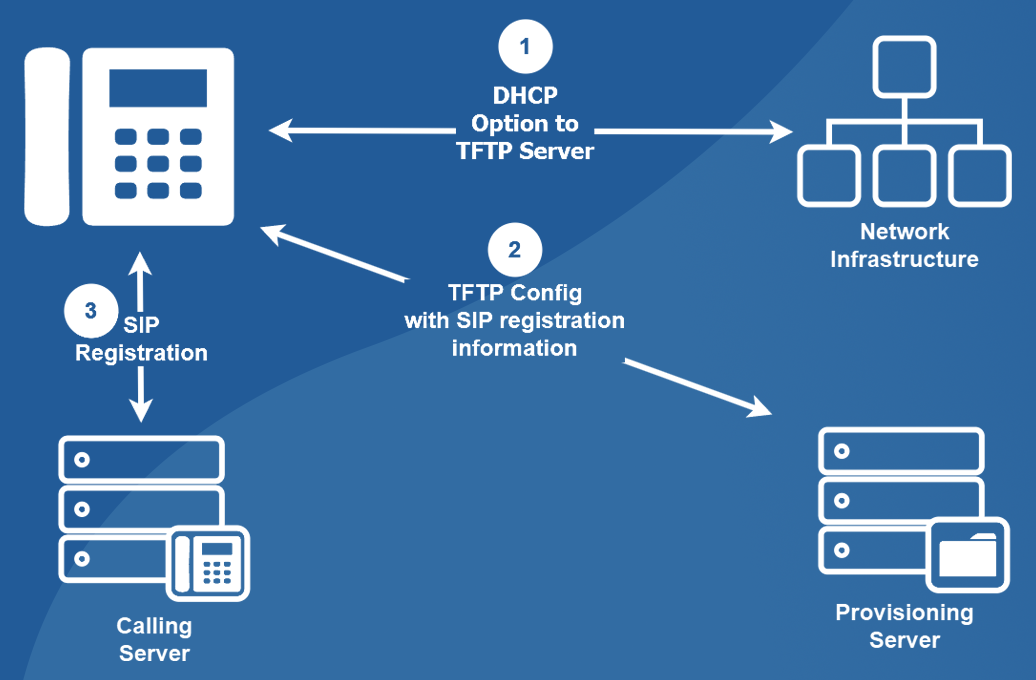
Before cloud ZTP, provisioning a desk phone typically required configuring and maintaining:
- Custom DHCP Options (such as Option 66 or 160 for Poly, or Option 150 for Cisco)
- On-premises provisioning / TFTP / HTTP servers
- Voice VLAN routing and internal firewall rules
- Device-specific firmware repositories and XML configuration templates
Each handset had to be connected to a specially configured corporate network—or staged manually by a technician before shipping—where DHCP options pointed the phone to an internal provisioning server, which in turn pointed it to a call control cluster.
Enter Zero-Touch Provisioning (ZTP)
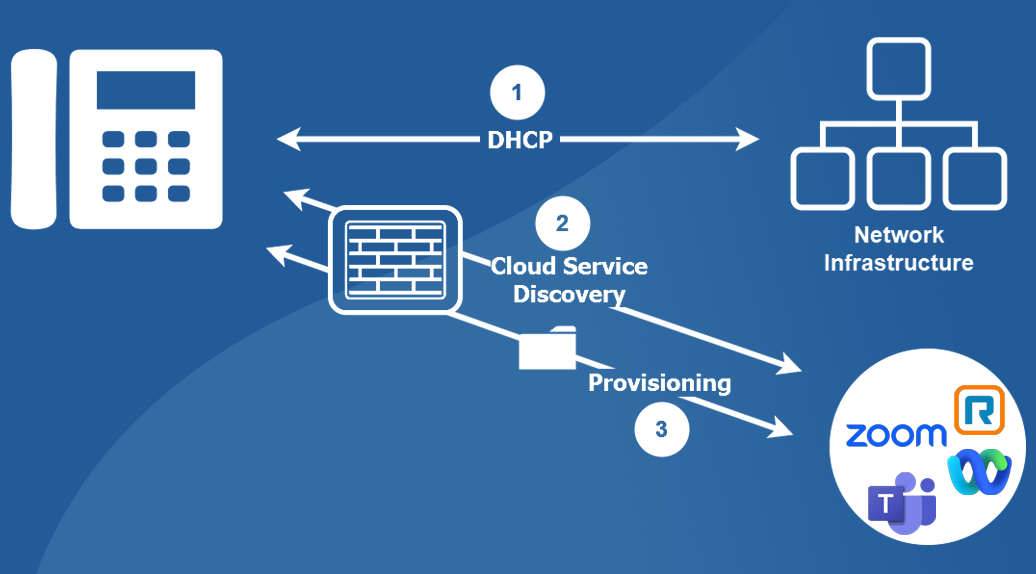
Zero-Touch Provisioning flips that model by leveraging manufacturer cloud redirection and service discovery instead of relying on local DHCP options or on-premises provisioning servers. Modern enterprise handsets from Poly, Yealink, Cisco, AudioCodes, and Grandstream support ZTP out of the box.
How ZTP Works Behind the Scenes
- Factory Boot: The phone powers on with factory settings.
- Standard DHCP: It obtains a standard IP address and DNS via DHCP (no custom DHCP Option 66/150 required).
- Manufacturer Redirection / Cloud Discovery: The phone contacts its manufacturer’s cloud redirection service (e.g., Poly Lens / PDMS-SP, Yealink RPS, Cisco GDS) or the UCaaS provider’s ZTP endpoint (Zoom Phone, Microsoft Teams, Webex Calling, RingCentral).
- MAC / Serial Lookup: It authenticates and checks its hardware MAC address and serial number against the provider’s provisioning database.
- Provisioning Response: When a tenant match is found, the cloud service returns the encrypted provisioning URL and configuration instructions.
- Automatic Registration: The handset downloads its configuration and firmware, reboots into service, and registers automatically.
IT Operational Benefits
- No DHCP Option Dependencies: Eliminates the need to manage custom DHCP scopes at every branch office—and works identically on a home worker’s residential router.
- True Drop-Ship Deployment: Pre-assign phones in your UCaaS portal by MAC address or serial number before they ever ship. Devices arrive plug-and-play.
- Bulk & API Automation: Import hundreds of devices via CSV or automate provisioning workflows through vendor REST APIs.
- Vendor-Neutral Flexibility: Mix and match certified hardware—such as Poly phones in corporate offices, Yealink handsets for specialized teams, or Cisco desk phones for executives—without maintaining separate backend provisioning servers.
- Dramatically Lower Deployment Labor: Engineers spend time on architecture rather than unboxing and staging hardware on a workbench.
Security Considerations
Modern ZTP implementations rely on mutual TLS (mTLS), factory-installed device certificates, and OAuth/token validation to verify device identity before any configuration is delivered. Enterprise platforms like Zoom Phone and Webex Calling also provide administrative locks so pre-registered MAC addresses cannot be claimed or redirected by unauthorized tenants.
Key Prerequisites to Keep in Mind
- Certified Hardware: Handsets must be supported and certified by your UCaaS platform with modern factory firmware capable of TLS 1.2+.
- Pre-Registration: Devices must be added to your tenant’s device inventory prior to plug-in so the redirection service knows where to route them.
- HTTPS Outbound Access: The voice VLAN or remote network must allow outbound HTTPS (
TCP 443) to the manufacturer and UCaaS provisioning endpoints.
Final Thoughts
Zero-Touch Provisioning isn’t just an operational convenience—it is a strategic enabler for hybrid workforces, cloud voice migrations, and lean IT operations. If your team is still manually staging phones on a bench, transitioning to a ZTP workflow can turn a multi-week hardware rollout into a single-day deployment.

Jaron Davis
Unified Communications Architect specializing in enterprise Zoom, Microsoft Teams, Cisco UC modernization, SIP/VoIP infrastructure, and systems architecture.